

Teams don’t lose time on major inefficiencies. Most loss happens on smaller issues like locating a task in an email, resetting a password, or locating a meeting request. Resolve these and the week flies by.
This list starts with bigger issues and ends with smaller, more helpful tools. First is Controlio, which helps teams monitor how their time is spent.
Next are browser extensions.
Time Management and Team Visibility
Controlio
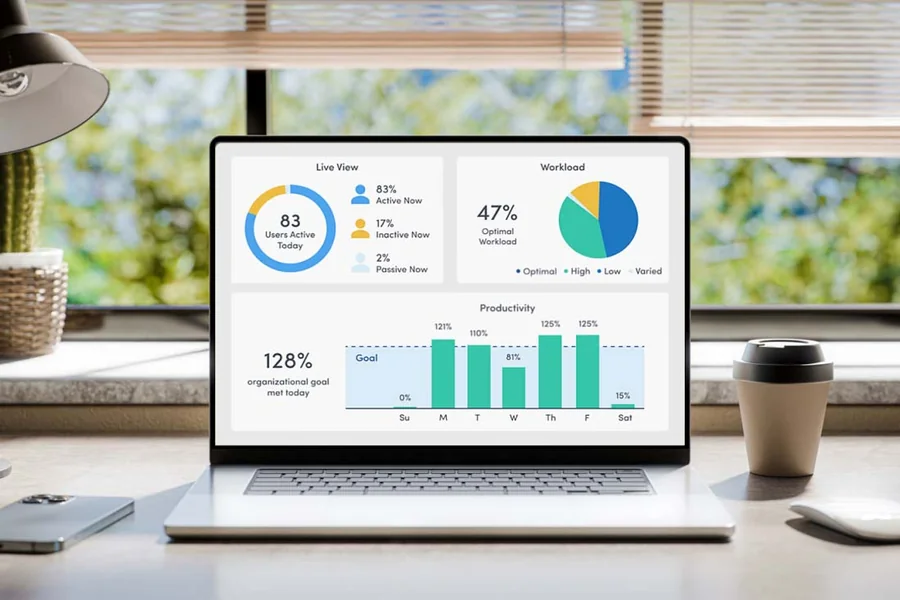
This is cloud-based software that tracks employee activities for offices, remotely and in a hybrid environment. Controlio shows which apps and websites employees use and assigns a productivity score to each user and department. Managers also have access to customizable and expandable activity reports.
It doesn’t function as a browser extension. Controlio provides a 14-day free trial. Tell your team what they are tracking to strengthen trust and build better work relationships. Controlio also has a feature called GDPR mode, which gives users control over the data tracked to comply with privacy regulations.
StayFocusd
This is an extension that helps users block time-wasting websites. Users are also given the option to block websites for a given time frame.
This app may have a negative effect on your productivity and should be blocked immediately.
Task Management
Trello
With Trello’s Gmail add-on you can turn an email into a task with the click of a button. You can also prioritize messages by board and share them with your team.
ActiveInbox
ActiveInbox allows you to add folders and lists to emails and include due dates. Everything relating to a client or employee can now be added and associated with that individual’s email.
Todoist
Like Trello, you can do similar tasks in Gmail to add deadlines and priorities to emails and share them with your team.
StickyNotes
StickyNotes lets you add text, images, and color-coded notes, which you can then move around the screen to leave reminders to yourself or others on your team. Notes are also synced across all your devices.
MyNotes
MyNotes is similar to StickyNotes but also captures the title and link to the page you’re viewing and gives you a built-in search feature to find past notes.
Grammarly
Grammarly has a similar function to ActiveInbox, which is to correct grammar and spelling in emails you write. It also can give definitions and synonyms and translate words to other languages.
LastPass
Like MyNotes, LastPass also captures and saves information you view, including webpages, and backs them up to your Google Drive. MyNotes also automatically captures a webpage’s title and URL. It has a search feature to locate past notes.
Ginger
Like Grammarly, Ginger is also an add-in for your browser to correct spelling and grammar while you email and edit documents.
Dashlane
Dashlane offers plans that include a VPN and dark web monitoring. The free version offers features like 2-step verification and secure note and password sharing. Small teams can use the free version to get started. Dashlane’s paid plans also offer a secure VPN and dark web monitoring.
Gmail Time Savers
KeyRocket
KeyRocket’s extension teaches and helps you practice Gmail’s keyboard shortcuts for composing and replying to emails and deleting emails.
Assistant.to
This extension helps you schedule meetings and set reminders to attend them. It also converts and adjusts to various time zones.
Handy Extras for Downloads
If you work with a lot of media, you may want to use an extension for downloading videos. Another extension captures the audio from a tab and saves it as an MP3 or WAV file. You may also use an extension to download videos and audio from a variety of sources.
Final Thoughts
Improving productivity is not as simple as flipping on one big switch. Look at how your team actually works to see where the biggest areas of wasted time are and address those areas specifically. Constant interruptions or time wasted on unproductive activities are the biggest thieves of time and should be priority targets. The first step to tackling your biggest problems should be to become aware of where you and your team’s time actually goes. Only after you’ve done that should you add extensions to solve specific problems. You may want to start with two or three, give your users a month to get used to the extensions, and only keep the ones that really improve productivity and effectiveness.
